Every production runs on a rotating cast. Staff editors, freelance assistants brought on for a reel, a colorist for two weeks, a director who wants to watch cuts but never touch the timeline. The problem is rarely getting people in — it's making sure the freelancer who wrapped last month can't still open the project, and the client can review without seeing your rough assemblies.
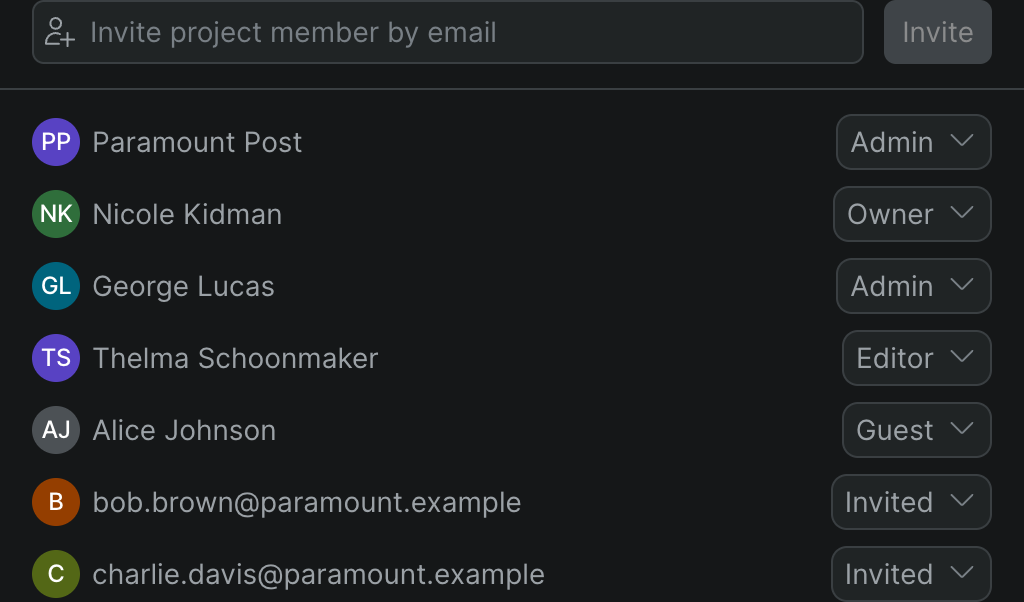
Sequence starts private. A project is visible only to the people you add to it, and access is governed by two separate, deliberate systems: workspace roles and project roles. Your workspace role sets what you can do across the whole team — create projects, manage members, control billing. Your project role sets what you can do inside one specific project — edit the timeline, manage that project's collaborators. The two don't share names or levels, so a full workspace Member can be a Guest on a sensitive project, and an outside freelancer can be a project Editor without ever seeing the rest of your work.
How access works#
Two role systems, on purpose
Workspace roles — Owner, Admin, Member, Guest — control the whole team. Project roles — Owner, Admin, Editor, Guest — control one project. See exactly what each role can do.
Invite by email, change roles anytime
Add people by email address and assign a role as you invite them; re-role or remove anyone later from the Members screen. Removing a member revokes their access immediately.
Guests for outside collaborators
Bring on a freelancer or an external reviewer as a Guest — they get access only to the specific projects you add them to, at the project role you give them, and can't create projects or roam the workspace.
Per-project control
Each project keeps its own member list on its Settings page, separate from the workspace. Add someone to one project without touching any other, and see who has access at a glance.
Onboard a whole team without inviting one by one#
For studios standardizing on Sequence, you can add your company's allowed email domains so anyone with a company address can self-join the workspace — no individual invites, and no personal Gmail or Outlook addresses, which the domain check rejects. Everyone who joins lands with the default Member role, ready for you to re-role or add to specific projects. Remove a domain and no one new can join, while existing members stay put until you remove them.
On security posture
Sequence is built for security-conscious teams: projects are private by default, access is scoped to the people you add, and workspace administration is limited to Owners and Admins. Set your team's expectations on what Sequence does today — private-by-default access and role-based permissions — rather than on certifications; if your production has a formal compliance requirement, talk to us before you commit.
Who it's for#
- Post supervisors standardizing a facility on one platform, who need every project locked to its own team
- Facilities and heads of post onboarding staff by company domain, then scoping access project by project
- Production companies with rotating freelancers who should lose access the moment a job wraps
- Teams working with outside clients who need to review cuts without seeing the rest of the workspace