When you nest one timeline inside another, or drop in a multicam clip, that inner element brings its own audio components with it. Sequence gives you two ways to treat those components in the parent timeline: Passthrough keeps them separate, so each inner component flows through on its own; Downmix folds the inner audio down to the parent timeline's output format. You pick the mode per element, so one nested timeline can pass through while another downmixes.
A nested timeline is a timeline placed inside another as a single element; a multicam clip is a set of synced angles edited as one element. For how audio components work in general, see Audio components and Track view.
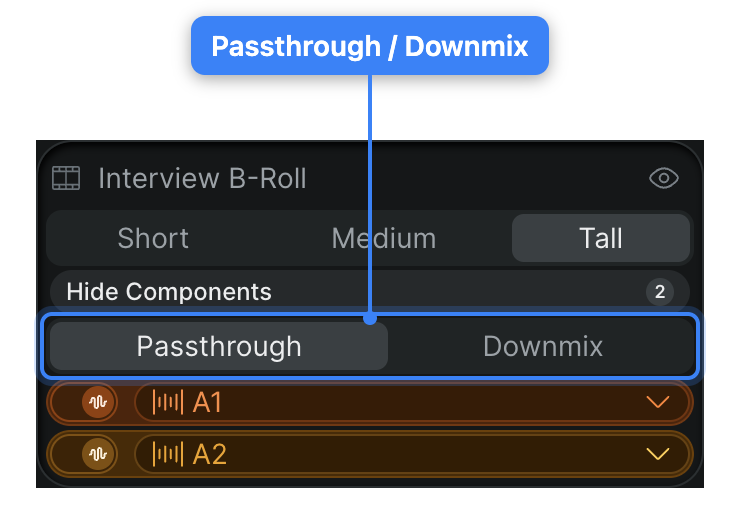
Choose passthrough or downmix#
The toggle lives with the element's audio components, so you reach it in Track view.
- In Sequence, switch the timeline to Track view. See Switch between Reflow and Track view.
- Select the nested-timeline or multicam element.
- At the top of the element's component list, click Passthrough or Downmix.
Sequence applies the mode to that element and updates how its audio reaches the parent timeline. The change saves with the project and is visible to your collaborators.
What each mode does#
Passthrough carries the inner element's audio components through to the parent unchanged. Each component keeps its own channels and its own routing, so the parent timeline sees the same component structure the inner timeline has. Use passthrough when you want to keep every inner stream distinct — to route or adjust them individually in the parent.
Downmix mixes the inner element's audio down to the parent timeline's configured output format. Instead of the inner components arriving separately, they're combined to match the timeline's output. Use downmix when the nested audio should conform to the parent's format rather than stay broken out.
Note
In passthrough, an inner component's channel-routing matrix is read-only, because its routing is fixed by the inner element. To edit that routing, switch the element to Downmix, or edit the source element instead. This is the case the routing matrix flags with "To edit routing, switch to Downmix mode or edit source elements." See Audio EQ and channel mapping.