Follow a collaborator to view their current timeline, zoom, and scroll position. Your view updates as they navigate, which lets you review an edit together.
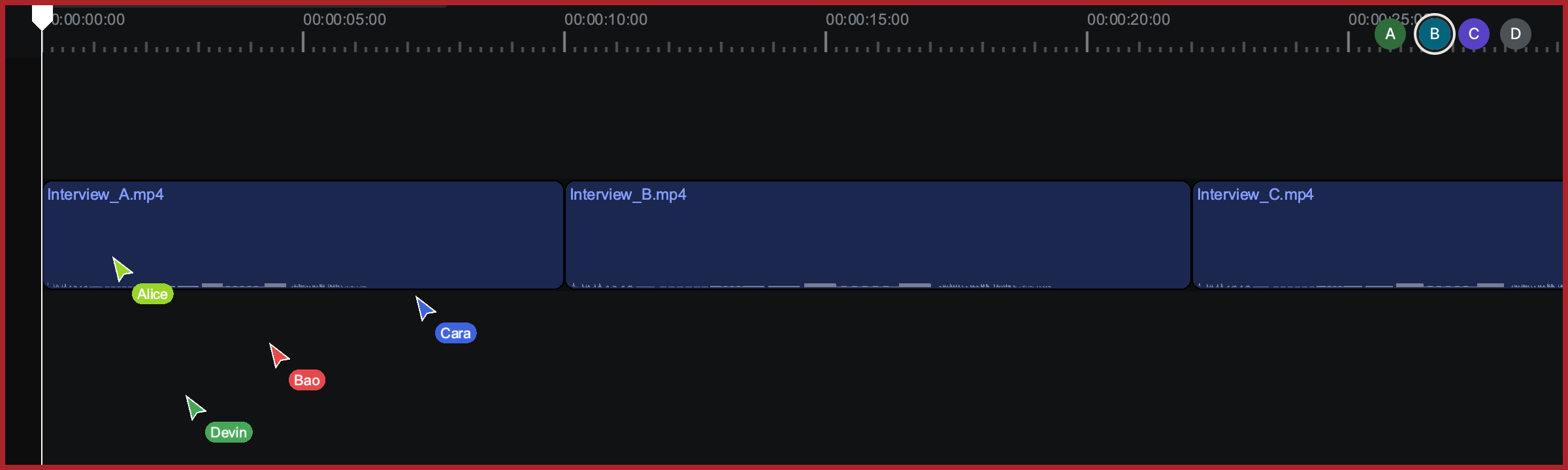
Everyone currently in the project appears as a row of avatars in the header. Sequence shows up to five of these collaborator avatars, each in that person's assigned color; if more than five people are present, a + count stands in for the rest.

Start following someone#
- In Sequence, open the project you're both working in so the collaborator avatars appear in the header.
- Click the avatar of the person you want to follow.
Sequence opens the collaborator's timeline at their zoom and scroll position. A ring highlights their avatar, and a frame in their assigned color surrounds the timeline. Your view follows their navigation.
Note
You can still select and edit clips while following. Only the timeline, zoom, and scroll position are mirrored.
Stop following#
Do any of the following:
- Click the same avatar again to stop following that person.
- Click anywhere outside the collaborator avatars in the header.
- Scroll or zoom the timeline yourself.
Following ends, the colored frame around the timeline disappears, and your view remains at its current position.
Tip
To review a cut with people who aren't in the project, send them a screening instead — they get a shareable player and comment panel without editing access. See Share a screening for review.