Final Cut Pro 7 XML (XMEML) is a long-established interchange format that many editors read for a cut. Generate an FCP 7 XML timeline package when your destination app imports XMEML but not OpenTimelineIO. DaVinci Resolve, Premiere Pro, and Avid Media Composer all read it. For the shared concept, see Timeline packages.
Note: This is the legacy Final Cut Pro 7 XML format (XMEML v5), a plain .xml file. It is not the same as Final Cut Pro X's .fcpxml — pick this format for tools that expect classic FCP 7 XML.
Generate an FCP 7 XML package#
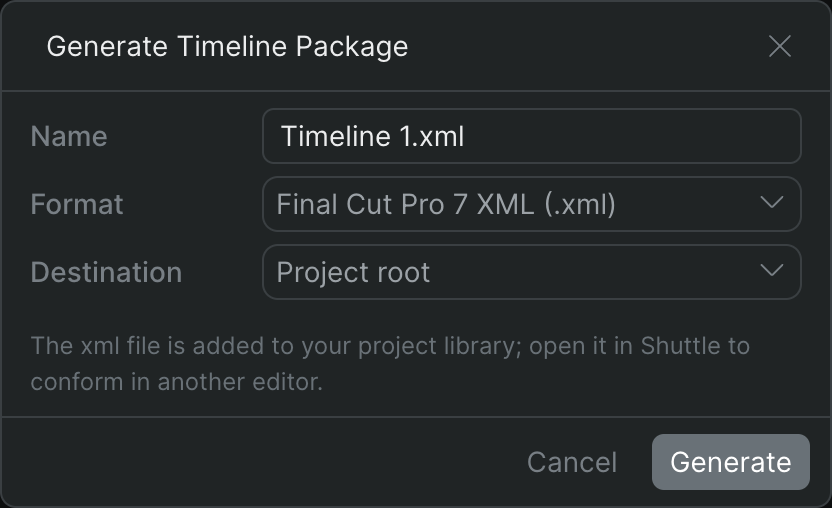
- In Sequence, right-click the timeline you want to take out and choose Generate Timeline Package.
- Type a Name for the file.
- Set Format to Final Cut Pro 7 XML (.xml).
- Choose a Destination folder in your project library.
- Click Generate.
Sequence builds the .xml file in the background and adds it to your library at the chosen destination. To open it in another editor with its media linked, open it in Shuttle — see Conform with Shuttle.
Once your project media is mounted and the package is open in Shuttle, import the file in your destination editor using that app's XML import command; it relinks to the mounted media.
Note: Effects, keyframes, and other clip properties don't yet translate — see Timeline packages. For a natively supported path into DaVinci Resolve, consider OTIO instead.