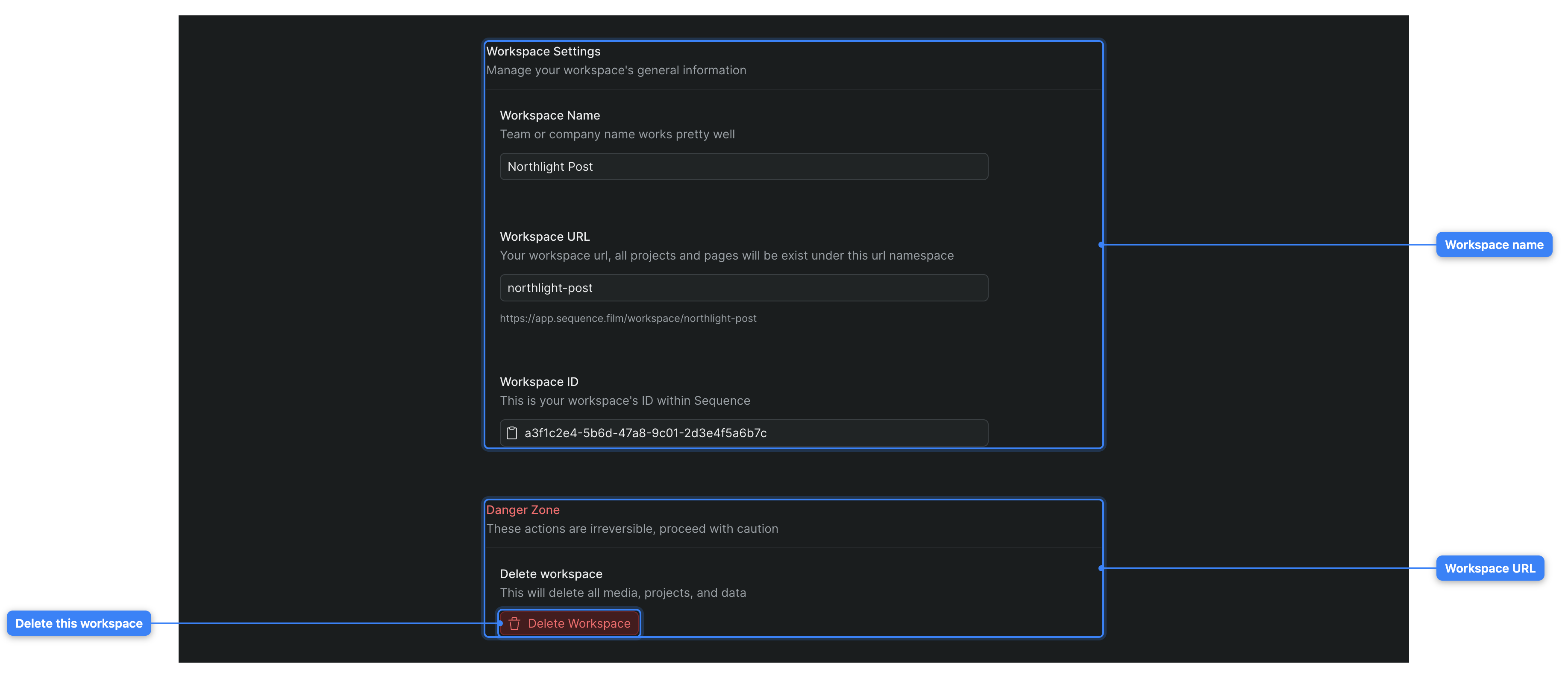
The General settings screen holds your workspace's account-level settings — its name, its URL, its Sequence ID, and the option to delete the whole workspace. These settings apply to the entire workspace and everyone in it, not to a single project. For one project's settings, see Project settings.
To open it, in Sequence go to workspace settings and, under Workspace in the settings sidebar, click General (the gear icon), alongside Members, Usage, and Billing. A Back to Projects button at the top of the settings area returns you to your workspace, and Contact the Team in the settings sidebar opens a feedback form.
Note
You need to be a workspace Owner or Admin to change anything on this screen. If you're a Member or Guest, every field is read-only and the Delete Workspace button is disabled. See Workspace roles and permissions.
Workspace Name#
The Workspace Name field sets your workspace's display name — your team, studio, or company name works well.
Type a new name in the field. A Save and a Cancel button appear once the name differs from the current one. Click Save to apply the change (or press Enter), or Cancel to discard it (or press Esc). Sequence trims surrounding spaces, saves the new name, and confirms with a toast; if the save doesn't go through, it restores the previous name and shows an error. An empty name is ignored.
Default: your current workspace name.
Workspace URL#
The Workspace URL field sets your workspace's slug — the part of the web address that every project and page in the workspace lives under (.../workspace/your-slug/...).
As you type, Sequence lowercases the text and replaces spaces with hyphens, and a preview line below the field shows the full address. The words new and join are reserved: if you enter one, Sequence outlines the field and blocks the change. Click Save to apply (or press Enter), or Cancel to reset the field (or press Esc).
When you save, Sequence may adjust the slug slightly to keep it unique across all workspaces, then redirects you to the new address and confirms with a toast telling you where the workspace can now be reached.
Default: your current slug.
Changing the URL moves every link
The workspace URL is the namespace for every project and page in the workspace. Changing it changes all of those addresses for everyone on your team, so previously shared or bookmarked .../workspace/old-slug/... links stop working. Change the URL only when you're sure, and let your collaborators know.
Workspace ID#
The Workspace ID field shows your workspace's unique identifier within Sequence. It's read-only — you'll mainly need it when you contact the Sequence team about your workspace.
Click the field to copy the ID to your clipboard (or, with the field focused, press Enter or Space). The field's icon briefly turns to a checkmark to confirm the copy, or to an X if the copy doesn't succeed.
Default: the workspace ID; not editable.
Delete Workspace#
The Delete Workspace control lives under the Danger Zone section and permanently removes the workspace and everything in it — all media, projects, and data — for every member, not just for you.
Warning
Deleting a workspace is permanent and can't be undone. Every project, all media, and all data are removed for everyone in the workspace.
- On the General settings screen, scroll to Danger Zone and click Delete Workspace.
- In the confirmation dialog, type the workspace's exact name to confirm. The confirm button stays disabled until the name you type matches.
- Confirm the deletion.
Sequence deletes the workspace and returns you to your Sequence home. The workspace and its projects are gone for everyone who belonged to it.
Availability: Owners and Admins only. For everyone else the Delete Workspace button is disabled and shown as a standard button rather than a destructive one.