A workspace workflow gives projects a shared set of production statuses. An overall status describes the project's progress; optional department statuses track disciplines such as Editorial, Sound, and Color independently.
Configure the workflow#
Workspace Owners and Admins can open Workspace Settings, then Workflow, to configure the workflow. Choose Setup to apply a starting preset: Creator, Agency, and Film & episodic provide different starting stages and statuses. Enable the stages your team uses and edit their statuses. Post-production, Completed, and Canceled are always available. Projects can move between enabled statuses without following a fixed sequence.
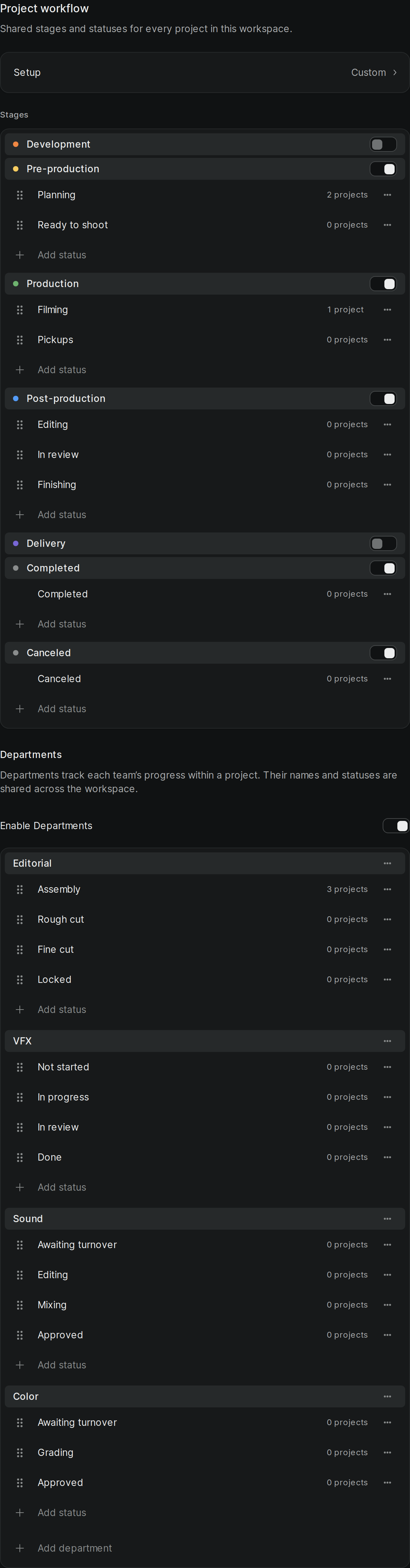
Turn on department tracking if you want separate progress for each department. Turning it off hides department progress but preserves the definitions and assignments for when you turn it back on. New and migrated workspaces start with Film & episodic definitions and department tracking off; applying the Film & episodic preset turns tracking on.
When deleting a status or disabling a stage that contains projects, review the affected projects and choose where to move them before applying the change. This includes archived projects. Changes and their moves can be undone together.
Set project progress#
On the project dashboard, right-click a project and choose Progress, then select a status under a stage. When department tracking is enabled, the same menu offers department statuses. Changing one department's status doesn't change the overall status or another department's status. See Manage projects on the dashboard.
Archiving is separate from progress: archiving preserves the project's statuses, and restoring it keeps them. A Completed or Canceled status does not itself archive the project.