When Sequence transcribes a clip, it also detects the characters in it — the speakers it hears and the faces it sees. The Characters tab, alongside the transcript, lists everyone Sequence found so you can review them at a glance. Character detection runs as part of transcription, so a clip has to be transcribed before its characters appear.
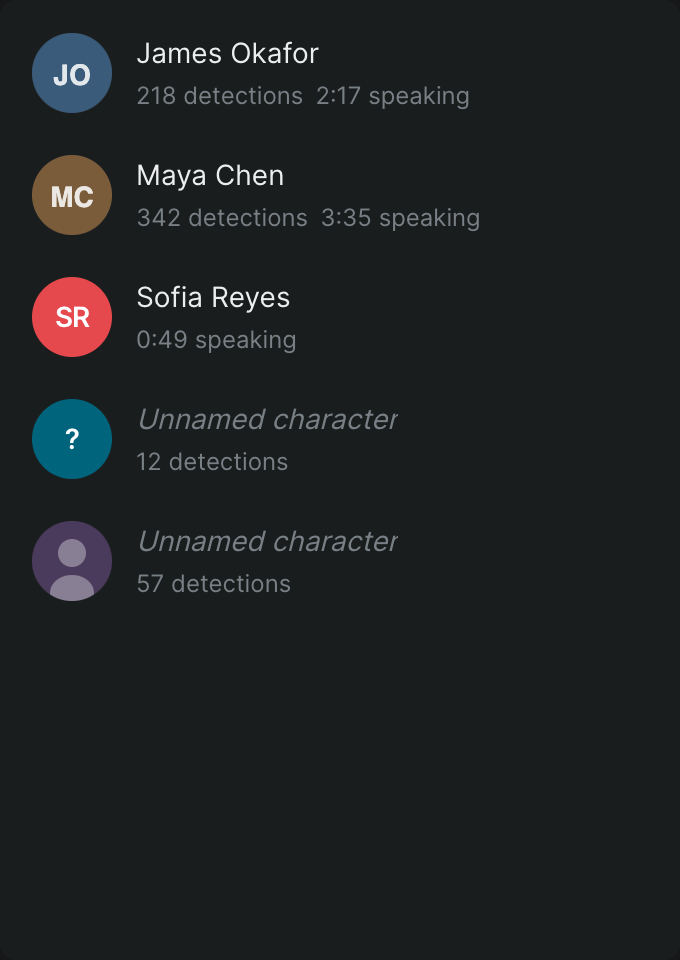
Open the Characters tab#
- In the project, select a clip that contains audio.
- In the inspector, open the transcription panel.
- Click the Characters tab.
Each row represents one detected character and shows:
- Name — the character's name, or Unnamed character if none has been assigned yet.
- Detections — how many times Sequence detected this character, shown as a badge on the row.
- Speaking time — the total time this character speaks in the clip, shown as a badge on the row.
If Sequence hasn't found any speakers or faces, the tab shows No characters detected.
Note
Detected characters currently show aggregate counts and total speaking time only. Names may be missing until a speaker is identified.