Collections are automatic views of your project's media, grouped by what your team has marked on it. Every reaction, rating, label color, and tag you add to a select shows up here, sorted into a collection you can open with one click. Collections are the payoff for tagging and rating footage: the more your team marks, the more useful this tab becomes.
You don't build collections by hand. Sequence populates them from what people mark across the project — so a collection is always current, and it's the same for everyone with access.
Open Collections#
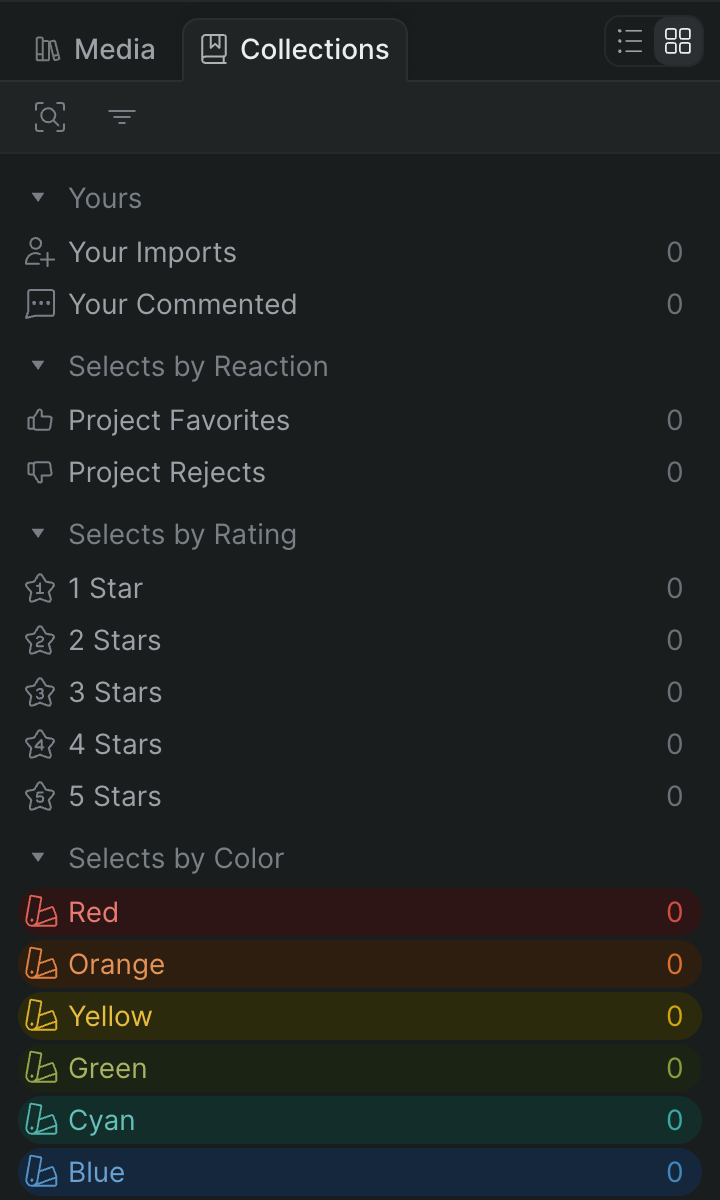
In Sequence, open the project and find the library panel. Click the Collections tab (next to Media) to switch the panel from your files to your collections. Each group is a collapsible section; click a group heading to expand or collapse it. Click a collection to open it and see the media inside; the media appears in whichever layout the library is set to — list or grid. To go back, use the control bar at the top of the panel to return to the full list of collections.
To jump to a marked moment, click a select inside a collection. Sequence selects it, scrolls the library to the clip it belongs to, moves the playhead to the start of the select, and opens the Inspect tab so you can see its details.
Collections share the library's media-type filter and search. To narrow a collection to Videos, Audio, or Images, or to search within it, use the control bar — the controls work the same way as in the library. See Organize files in the library.
Add a whole collection to the timeline#
Drag a collection's row — for example, Project Favorites or a color group like Red — straight into the timeline instead of opening it first. Sequence adds every item in the collection to the timeline, in the collection's display order. A select in the collection keeps the trimmed range you marked on it; an untrimmed clip is added in full. See Add clips to the timeline.
What's in each group#
Collections are organized into groups. A group only appears when it has something to show, so the exact set you see depends on how much your team has marked.
- Yours — Media tied to you. Your Imports holds every file you uploaded to the project, and Your Commented holds the clips you've left open (unresolved) comments on. See Add and manage comments.
- Project Tags — One collection per project tag, each holding the selects that carry that tag. This group appears once the project has at least one tag.
- Selects by Reaction — Project Favorites gathers every select marked as a favorite; Project Rejects gathers every select marked as rejected.
- Selects by Rating — A collection for each star rating, from 1 Star through 5 Stars, holding the selects rated at that level.
- Selects by Color — One collection per label color — Red, Orange, Yellow, Green, Cyan, Blue, Purple, and Magenta — plus None for uncolored selects.
- Characters — One collection per person Sequence detects across your footage, holding the clips they appear in. Sequence indexes characters automatically as assets are uploaded and processed, so this group can be empty until that finishes.
Selects, tags, ratings, colors, and reactions all come from marking media — a select is a named, marked range you keep for reference. To create the marks that fill these groups, see Tag and label media.
Note
Collections update as your team works. A tag someone adds, a rating someone changes, or a comment you resolve is reflected the next time you open the collection — you never refresh or rebuild it yourself.